

I consider myself platform-agnostic… I’ve run lots of SEO programs for B2B companies in WordPress, Webflow, custom PHP, and many other platforms I’d rather not remember/talk about.
At first glance, running SEO in a headless CMS like Sanity doesn’t seem that appealing. Out of the box, it’s fairly “featureless” for running a program. The promise of a headless CMS is that you have the ultimate front-end flexibility, but the value prop for organic discoverability is less clear and sometimes more challenging
Boy was I wrong.
I’ve been building websites and managing SEO strategy through Sanity CMS this year and having an absolute blast. This includes building the website you’re on right now with my business partner, Joshua Sauder! (Very meta, I know.)
In addition to Webflow, Sanity is now a frontrunner for the type of projects we do. SEO is my primary focus, and now most of that work runs through the Sanity MCP server and Claude. I type what I want changed, the agent reads the project rules, and executes with approval checks along the way.
Keyword research, content outlines, internal linking, on-page improvements, analytics, conversion/revenue reporting, and content migrations all start with a prompt rather than a dashboard or CSV.
Combining the right strategy, your LLM of choice, and the right connectors is a game-changer for SEO work because it enables a very small team to execute a vision quickly.
This is for SEOs, marketers, and founders considering Sanity, and for teams deciding whether a headless CMS will fight them on SEO. If you've searched "sanity seo" and found only plugin READMEs and developer tutorials, this is the view from the operator’s seat.

A fair warning I’ll give: this setup gives you a ton of execution power.
Like many systems and software, it lets you get things done 10x faster, but organic optimization is, first and foremost, a discipline of doing the right things.
So before you deploy a stack like this, make sure you have a durable strategy that will withstand competition, search engine updates, and evolving search surfaces. It’s not a substitute for strategy, but it is an unbelievably good execution partner.
If you are operating with a team of any size, governance, swimlanes, permissions, and approvals are definitely considerations. With good intentions, it’s entirely possible to do a lot of harm, fast.
What the Sanity MCP is, in SEO terms
The Sanity MCP server is a remote server, hosted by Sanity at mcp.sanity.io, that lets an AI agent like Claude read and edit your Sanity content, schema and assets through 40+ tools. It went generally available in December 2025.
The tool list reads like a developer's menu. Translated into SEO jobs:
get_schema: learn which fields exist before touching anythingquery_documents: find every post missing a meta descriptionpatch_documents: rewrite title tags across a batch of pagescreate_documents: add directory listings or new article draftspublish_documents: push approved drafts live- Asset uploads: bring images in from a URL or file, then attach them to a draft
Most SEO work on a structured CMS is tedious edits to named fields: title, slug, meta description, target keyword, category reference. The sanity mcp makes those fields addressable in plain language. That's the whole trick.
The stack: Sanity plus the MCPs I pair it with
Sanity on its own gives an agent write access. Write access isn't SEO. The value shows up when the agent can see keyword data, search performance, and the writer's draft in the same conversation as the CMS.
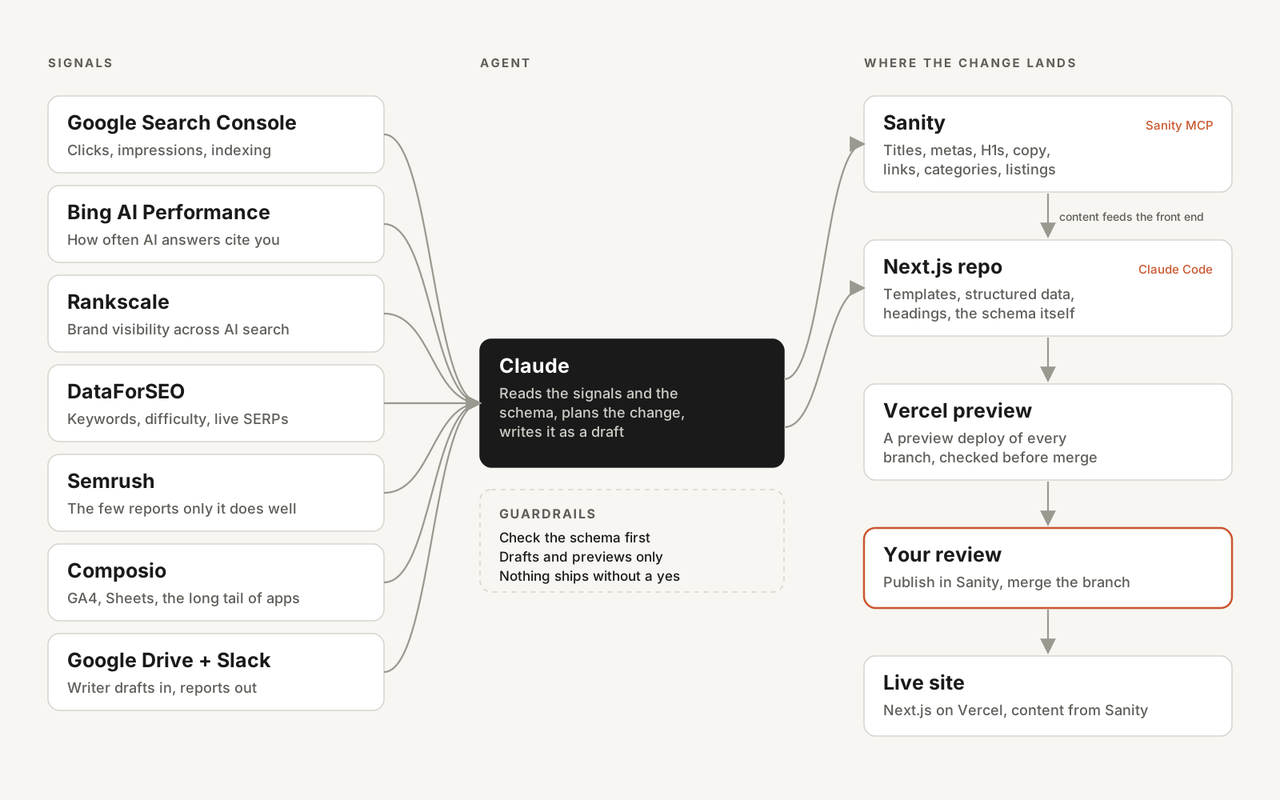
Here's what I connect:
- Sanity: The CMS. Path to Flow runs a Next.js front end with Sanity behind the blog, agency and app directories, showcases and jobs.
- Google Search Console: Clicks, impressions and indexing status, so fixes start from what Google actually did.
- Bing AI Performance: Bing Webmaster Tools' report on how often AI answers cite your pages. It's the closest thing to Search Console for AI search.
- Rankscale: Brand visibility across AI search, tracked on a fixed set of prompts.
- DataForSEO: Keywords, difficulty and live SERPs. The dataforseo mcp does most of my research because I can pull exactly the call I need.
- Semrush: Reserved for the few reports only it does well, to save credits.
- Composio: A gateway that puts GA4, Sheets and more behind one connection. I wrote up that setup in MCP for marketing.
- Google Drive and Slack: Where the writer hands off drafts, where the agent reports back, and where a daily 8am content radar posts topic ideas mapped to CMS collections and keyword data.
- Experiment/Change Log: There are many ways to set this up, but popular options include a Notion database, Slack alerts, and an initiative-tracking dashboard. This prevents “random acts of SEO” that some teams are tempted to commit.
One more layer sits under all of that: Vercel and Claude Code. Vercel hosts the Next.js front end and builds a preview for every change, and Claude Code works in the repo when a fix lives in a template instead of a field. More on why that matters below.
No single seo mcp does the job. The useful unit is the combination: research tool, CMS and feedback loop in one place, so a finding becomes a field edit without a copy-paste step in between.
Six workflows that changed how I do SEO
The sanity mcp earns its keep in the boring middle of SEO: the step between "I know what this field should say" and "the field says it." Each workflow below shows the old way, the prompt, what landed in Sanity and what changed.
Keyword to live field in one conversation
The old way was a spreadsheet, a SERP check in another tab, then a trip to Studio to paste values into fields.
For a Webflow speed app listing, I asked for this:
Find the best target keyword for this app listing. Check live SERP intent before picking. Then write the slug, title and meta description into a Sanity draft.
The higher-volume term was "webflow optimization" at 320 searches a month. The SERP showed it meant Webflow's own A/B testing product, so the intent was wrong. The agent picked "webflow speed optimization" at 20 a month, KD 3, and wrote the slug, title, description, and put some H2 placeholders into a draft in the same conversation.
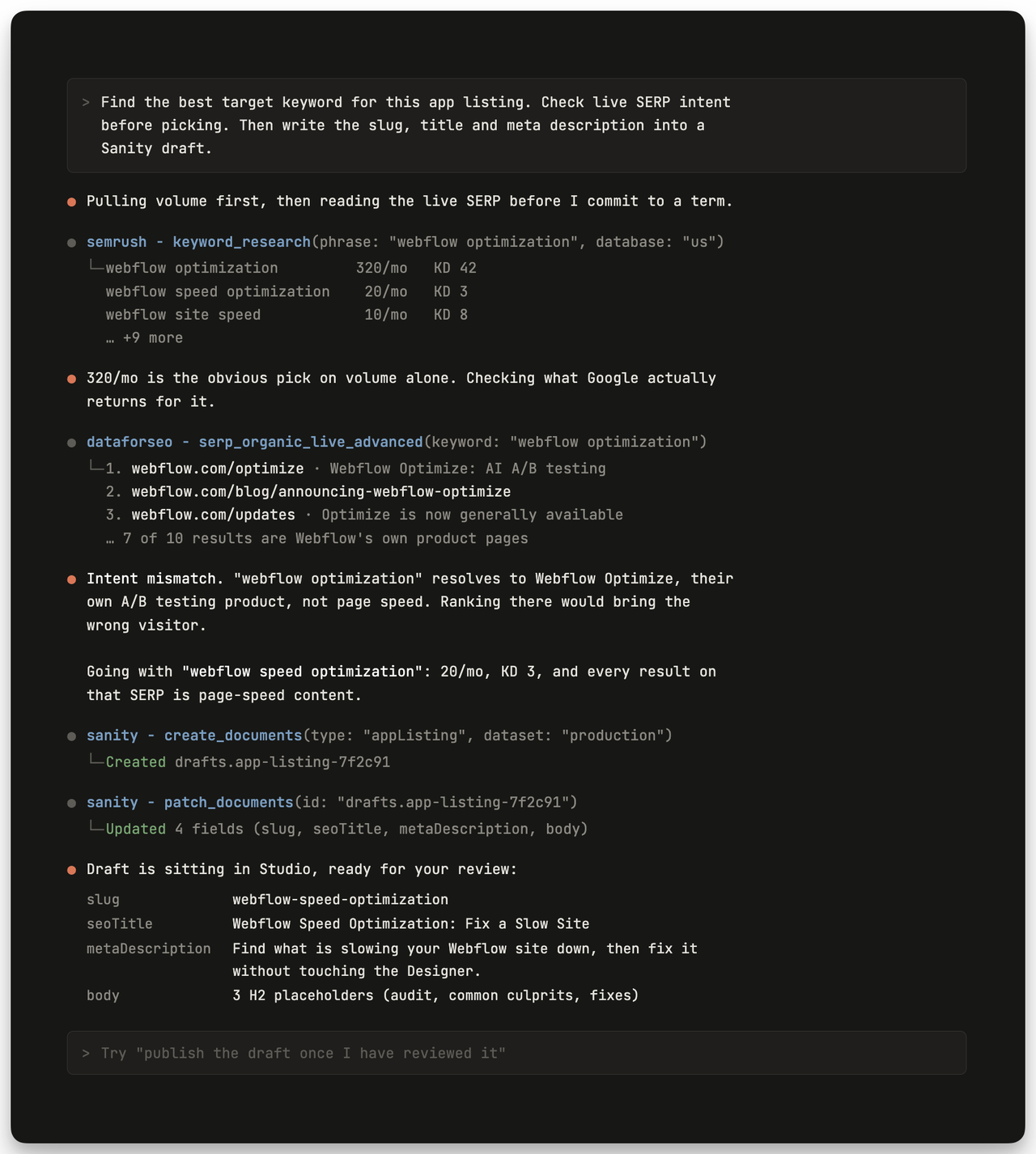
The live SERP connection with DataforSEO caught the intent problem. Having the schema in the same session meant the fix landed in the right fields without me retyping anything.
Writer doc to approved Sanity draft
Writing happens in Google Docs and on completion the doc in a shared Slack channel. An hourly scheduled task picks it up, exports a DOCX, converts it to Portable Text, pulls in images via Sanity's upload-from-URL, creates a draft, logs it, and DMs me a report.
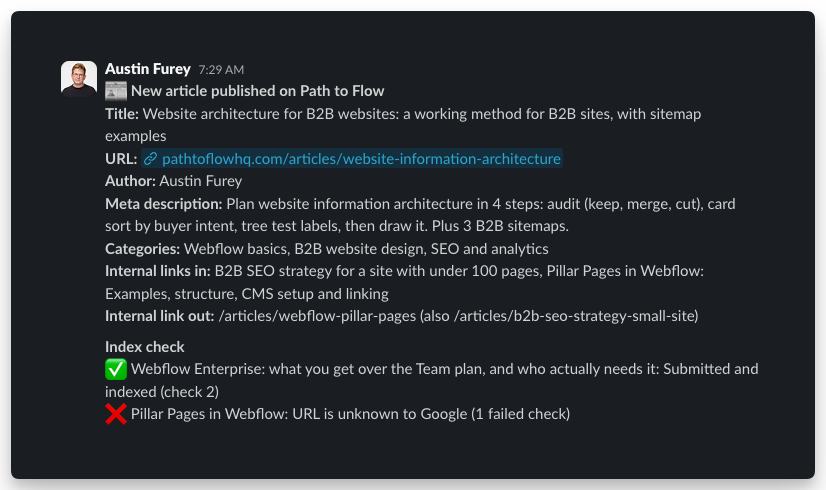
Once the draft is approved, it sits in the publishing queue. New content goes out on a schedule to smooth out the publishing cadence. The publishing is automated, but it pings a committee Slack channel to review the final details, and does an indexing check for recent content that is not indexed yet.
Time from approved content to ready to publish: ~1 min vs 30-60 min
Internal linking agents that run on a schedule
Internal linking is the SEO job everyone agrees matters and nobody does consistently. The old way was a quarterly crawl, a spreadsheet of orphan pages, and a few hours of hunting for the right sentence to put a link in.
Now two agents handle it. The first runs with every new article: when a draft goes live, it adds 2 inbound links from published articles on the same topic and at least 1 outbound link to a related page. The new page never starts life as an orphan.
The second runs weekly on existing content.
Its setup:
- Money pages: a fixed list (important target impressions) plus the top 10 pages on the “click zone fringe” with top Search Console impressions over the last 28 days, refreshed every run. If Google is already testing a page, the agent sends it internal link support.
- A cluster map: every article belongs to a topic cluster with a pillar. Siblings link to each other, and supporting articles link up to the pillar and the money pages in their topic.
- A target: at least 3 contextual inbound links per money page, counted fresh from the body text of published articles.
- Anchor rules: the agent links a phrase that already exists in the article whenever it can, and appends a short clause only when it can't. The exact main-query anchor goes on one link per target, site-wide, so anchors don't all read the same.
- A cap and a log: A defined number of new links per run, so changes stay small enough to review. A state file records every link added, every page skipped and why, and each money page's impressions, average position and inbound link count over time.
This is the one place I let an agent publish without asking first. Link edits to live articles are small and reversible, and the log means I can see and undo every one. The agent also skips any article that has unpublished draft changes waiting, so it never pushes someone's half-finished edit live along with a link.
The skips are useful too. When a money page gets no links because no published article mentions it, that's a content gap, and it goes on the writer's list.
Search Console feedback turned into fixes
The indexing report became the brief. The fix was to make listings editorial, with a point of view, instead of a spec sheet with a logo.
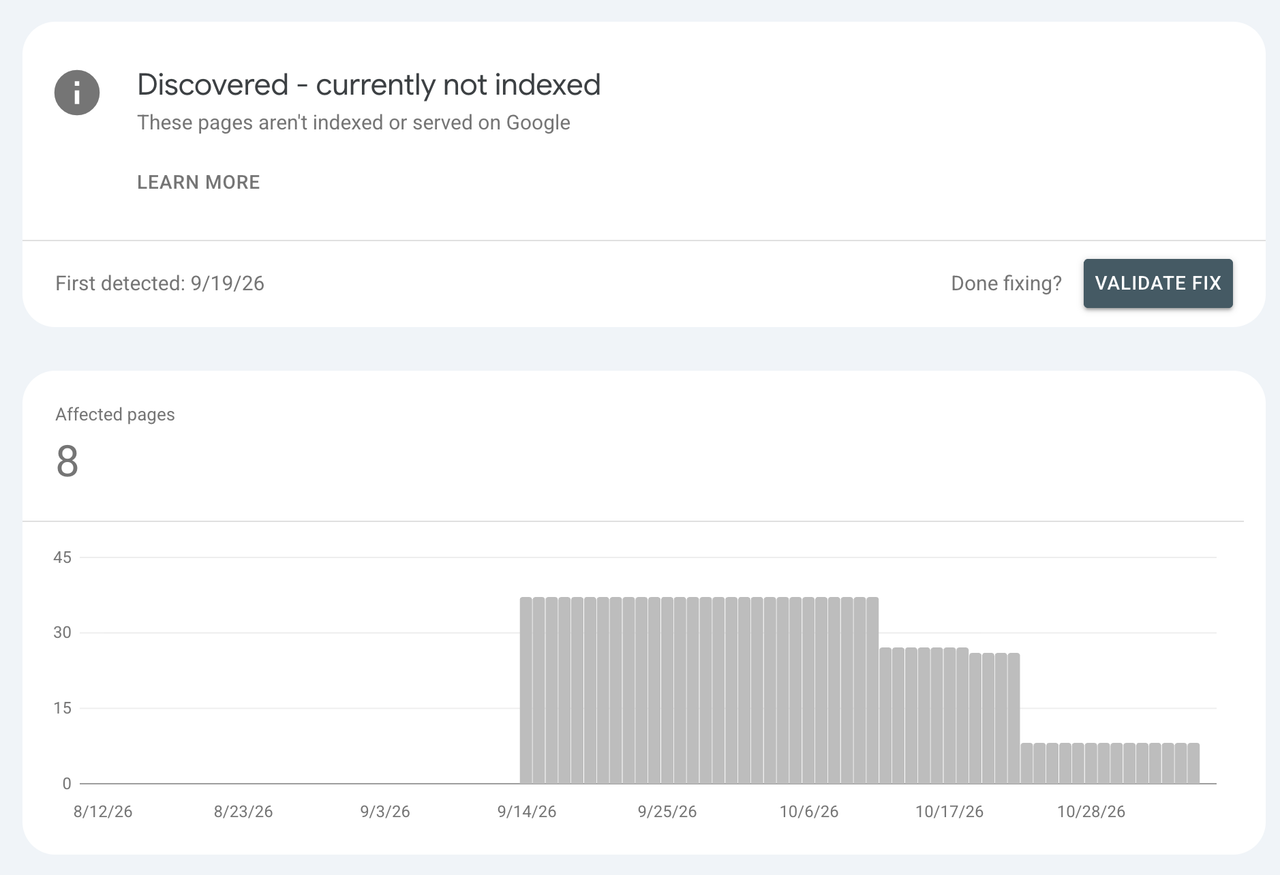
That meant a writer brief with an H2 menu for each listing, plus rewritten titles, metas and H1s. It also meant schema work. In October 2026, our developer added an seo object to the directory types (title tag, meta description, target keyword override), and the app long description got a full rich text editor so editorial H2s have somewhere to live.
Result: From ~30% of new content “discovered and not-indexed to ~0%
Bulk on-page rewrites across a large library
On Path to Flow, I queried every blog post and found 11 articles with missing or weak SEO data. The agent wrote new titles and metas in one format, "Keyword | reason to click | Path to Flow", patched them as drafts, and I approved publishing the 7 that were already live.
One target keyword got swapped. "website architecture b2b" had no measurable volume, so it became "website information architecture" at 210 a month, KD 6.
The same approach scales. For a SaaS company with a 270+ entry library, I rewrote H1s and meta fields for 272 entries of a content library in one structured pass, plus a 183-row blog import. When every field has a name, a batch is a loop. In Sanity that loop runs 25 documents per patch_documents call.
CMS tweaks without breaking links
Path to Flow's blog categories went from 6 feature-based to 9 intent-based. I renamed 4 in place, which kept every post reference intact, and created 5 new ones.
Order matters. Categories get published first, then posts get patched and published, because a post can't reference an unpublished category. Slug changes went to our developer so the front-end filter wouldn't break.
Why Sanity specifically
Would any CMS with an MCP do all of this? Some of it. The parts that worked best depended on how Sanity stores content.
- Structured content: Fields are fields, not blobs of HTML. An agent can target a meta description without parsing a page.
- Schema the agent can read: The agent calls
get_schemaand knows exactly what exists. - GROQ: Sanity's query language turns "every post where the target keyword is empty" into a single query.
- Drafts: Edits land in a draft or release version, never directly on published content. Publishing is a separate call.
- Server-side rendering: Sanity doesn't render pages; your front end does, and that split works in your favor. Our Next.js front end renders on the server, so every field the agent edits, from the title tag to the FAQ markup, is already in the HTML on the first request. That matters for AI search: Vercel's crawler research found that none of the major AI crawlers, including OpenAI's and Anthropic's, execute JavaScript. Content that only appears after client-side rendering is invisible to them.
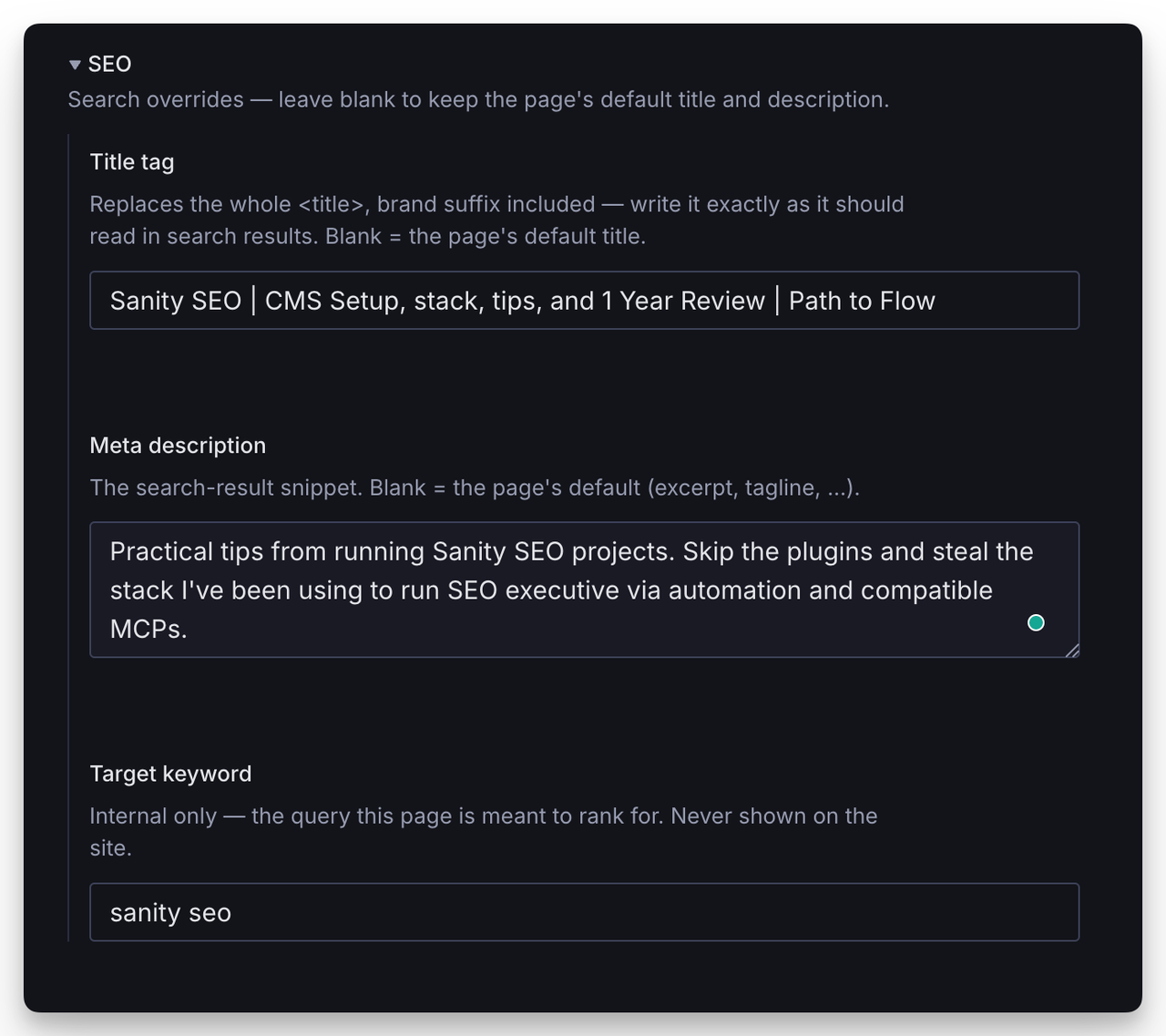
The seo object on page types existed only after I thought about what I wanted them to be, and which ones should be mandatory. That's the trade-off of headless cms seo: you get exactly the fields you build.
Webflow has its own official MCP server, and I use it (see Webflow MCP timesavers and is Webflow good for SEO). WordPress got an official MCP Adapter plugin in February 2026, though I haven't run it in production. The difference that matters to me is where the content model lives. In Sanity it's schema code a developer controls, which is more flexible and more dependent on that developer.
Sanity, Vercel and Claude: on-page SEO without the handoff chain
On most marketing sites, an on-page fix that touches a template becomes a ticket. The SEO writes it, a designer mocks it, a developer builds it, and someone approves the deploy. The fix is small. The queue is not.
A headless stack collapses that chain. Path to Flow is a Next.js front end on Vercel with Sanity holding the content, and Claude can reach every layer:
- Content (Sanity MCP): titles, metas, H1s, body copy, internal links, image descriptions, category references.
- Code (Claude Code in the Next.js repo): page templates, heading structure, structured data, canonical and meta tag output, internal link modules, new page types, and the Sanity schema itself.
- Deploys (Vercel): every pushed branch gets a preview deployment, so I can check the rendered page, view source and crawl it before anything merges. Vercel's official MCP server also lets the agent read deployment logs when a build fails.
Put together, the SEO holds design and development access to every on-page element, not just the fields someone exposed in a CMS. Say a directory listing needs an FAQ section with FAQPage structured data. That used to be three requests: a schema field, a component, the markup. Now it's one conversation, one preview URL, one review.
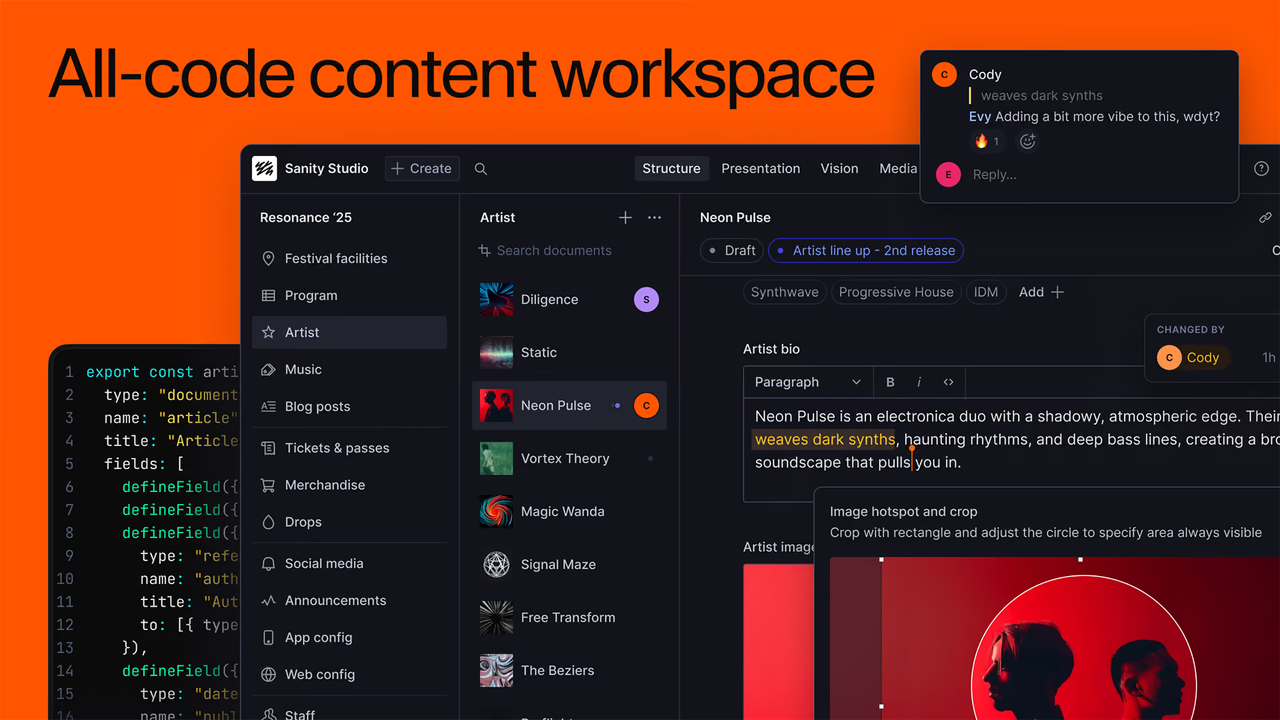
That's the answer to the tradeoff in the last section. On a headless stack, "you get exactly the fields someone built" stops being a constraint when the someone can be you.
Two rules keep it from going sideways. Code changes ship through preview deployments, never straight to production. And if you have a developer, keep them as the reviewer on anything that touches the schema or shared components. Autonomy removes the queue. It shouldn't remove the review.
Where it still breaks
Most of these cost me time before I knew about them. The rest are in the docs and worth knowing before you hit them.
- Random Acts of SEO: As I mentioned before, having the ability to execute so quickly requires discipline. Follow your strategy, not the flavor of the week.
- Portable Text needs a
_key:Every block and span needs one, or the write fails. - Phantom fields: Skip the schema check and the agent will write to a field that doesn't exist.
- SEO fields aren't defined: You have complete control over the specific SEO fields you want your collections to have - it doesn’t come out of the box like with Webflow or other CMS platforms.
- Publish order. Categories must be published before posts can reference them.
- Batch limits.
patch_documentshandles up to 25 documents per call, so big jobs run in batches.
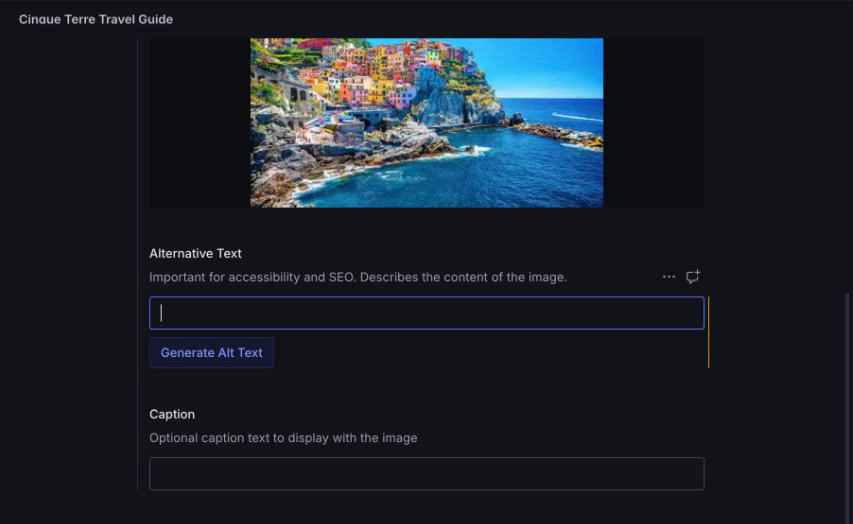
For example: Once your template has an alt field, Sanity can generate alt text on upload. Use the plugin or create your own custom rules. Image: Sanity
The guardrails I run
Nothing publishes without my yes. Which may not be the case for your team; some decisions should be by committee.
That rule tops a short checklist you can copy:
- Query the schema and existing documents before writing anything.
- Drafts only. The agent never publishes on its own.
- Explicit yes before every publish, including "publish all."
- Patch with revision ID checks (
ifRevisionId) so a teammate's edit isn't overwritten. - Keep a conventions file with project conventions, ID patterns, and voice rules (sentence case).
- Run a second agent to fact-check drafts before I read them.
- Label any keyword data that wasn't pulled live.
- Associate and store your target keyword as an admin field. This makes referencing across the site easy, and prevents cannibalization.
- Auto Slack message to the group who can approve/publish. Reminder alerts for when something is staged as a draft too long.
- Log strategic changes to the shared experiment tracker.
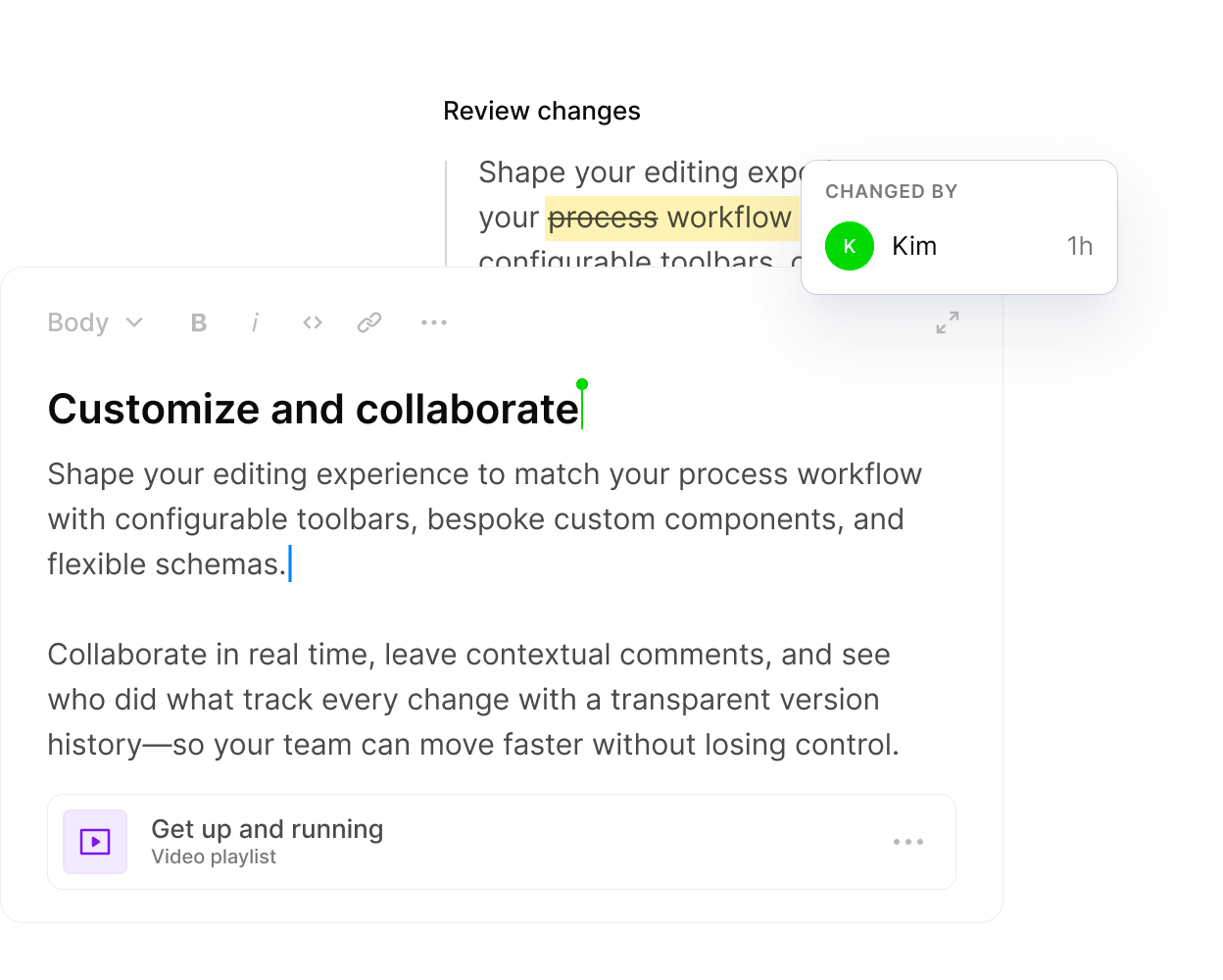
Every edit is attributed in history, which is how you spot what the agent touched. Substaintial/strategic changes are stored in your experiment change log. Image: Sanity
How to set it up if you're a marketer, not a developer
You don't need to write code to connect the sanity mcp server. You do need a Sanity login with access to the project. The Sanity MCP docs cover the details. Here's the short version.
- Pick your client: Claude desktop or web works fine for SEO work. Sanity is also available as a connector in Claude.
- Add the server: In Claude, add
https://mcp.sanity.ioas a custom connector. If you use Cursor, VS Code or Claude Code,npx sanity@latest mcp configuresets it up for you. - Log in: Auth uses your normal Sanity login through OAuth, so there are no tokens to manage at the start. Edits show under your name in revision history. Scoped API tokens are optional.
- Start read-only: Make your first prompt "show me the schema for blog posts." Learn the field names before you change any.
- Write your conventions file, then test one draft edit. Pick a single title tag. Check the draft in Studio. Publish it yourself.
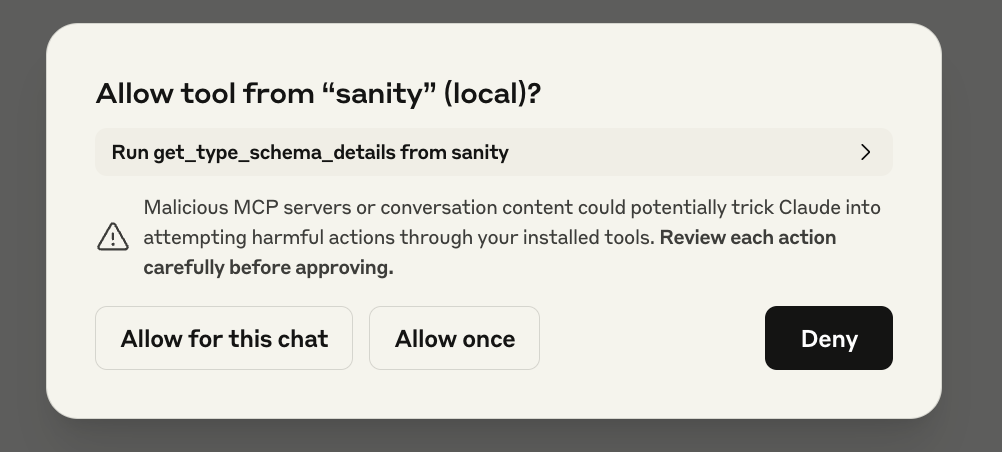
Claude asks before it runs a Sanity tool. Approve each one until you trust the prompt. Image: Sanity
The server ships with 200+ lines of built-in agent instructions that teach the agent how Sanity works, such as checking the schema before querying. Those cover some of the breakages listed above. Not all of them.
Is it a game changer?
Here's the tally from the sanity mcp side of the year:
- Hundreds of human-crafted content pieces organized, optimized, published and tracked.
- Problems and opportunities being proactively solved for with your approval.
- 272 library entries rewritten in one pass
- Thousands of unique target keywords tracked, synced with their associated content in Sanity and experiments reporting in a loop
- Tedious tasks like executing a world-class internal linking program become… dare I say, fun?
- Easily connecting content, experiments, and initiatives to revenue and other success metrics.
- Granular, tailored reporting for individual team members, with various KPIs and objectives.
That's content operations output from one SEO with a writer and a developer on call. For that kind of site, the thesis holds.
The fine print: speed also produces slop. You must have humans with taste, strategy, and vision in the pilot seat. You should not sacrifice quality output for convenience.
Who shouldn't bother: a small site with one editor and no backlog. If you edit three pages a month, Studio is fine, and your time is better spent on strategy for a small B2B site.
The next gains will come more from the schema than from the MCP. The sites that get the most from this setup will be the ones whose fields were built with SEO in mind.
FAQ
Is Sanity good for SEO?
Yes, if the schema includes the fields you need. Sanity's structured content makes titles, metas, slugs and target keywords easy to query and edit in bulk, which suits agent-driven SEO work through the Sanity MCP. The catch is that SEO fields only exist if a developer adds them. See "Why Sanity specifically" above for the tradeoff.
Does Sanity have an SEO plugin?
Not one you should plan around. The practical route is defining SEO fields in your own schema, like the seo object (title tag, meta description, target keyword override).
Can Claude publish to Sanity directly?
Yes, but not by accident. The Sanity MCP saves edits to a draft or release version, never directly to published content, and publishing is a separate tool call. I add my own rule on top: nothing publishes without an explicit yes from me, including bulk "publish all" approvals. Patching with revision ID checks also keeps the agent from overwriting a teammate's edit.
Is the Sanity MCP server free?
The standard tools don't consume AI credits, because they're ordinary API calls. Only generate_image and transform_image use AI credits. Sanity's docs don't state which plans include MCP access, so check your plan before assuming it's available to you. Normal content work like querying, patching and publishing drafts falls under the standard tools.
Do you need a developer to use the Sanity MCP?
Not for setup or day-to-day edits. You can add it as a connector in Claude and log in with your Sanity account through OAuth. Schema changes, such as an alt field or an seo object, take code. On a headless stack with Claude Code and Vercel previews, an SEO can make those changes too, but have someone review anything that touches shared components.

