

Until this week, the Relume MCP story was about components. The Library MCP, released July 1, 2026, let AI editors like Cursor and Claude pull Relume components into a codebase. On October 14, 2026, Relume shipped Publish MCP, which lets Claude or ChatGPT build a full Relume site, publish it and keep editing it from the chat.
It also includes a skill that rebuilds the published site in Webflow with Client-First classes. That is the part Webflow agencies should watch.
Below: what the release does, how to connect it, what it costs and where the rough edges are.
What Relume Publish MCP does
Most AI site builders guess at design and code, then leave you to prompt for responsive layouts, SEO settings and pre-publish checks. Publish MCP takes a different route: it connects your assistant to the Relume app itself, so it works with the same components and publishing as the app. Once connected, the assistant can:
- Create a project and write the website brief
- Generate the sitemap and wireframes
- Set up the style guide
- Add your images
- Publish the site
- Keep making changes after launch
The output is a normal Relume project that stays fully editable in the canvas, so you can fix a layout by hand whenever that is faster than describing it. Every change is saved as a snapshot you can roll back. The MCP only edits projects your Relume account can already edit.
The bigger shift is context. Because the work runs inside Claude or ChatGPT, the assistant can use your other connected tools. Relume's demo pulls a client questionnaire from Notion and brand assets from Google Drive, then emails the published link through Gmail.
Publish MCP vs Library MCP: which Relume MCP do you need?
In August 2025, Relume told its community it had no MCP server. It now runs two, and the names make it easy to grab the wrong one. In short: Publish MCP builds Relume sites, Library MCP feeds components into code.

What they touches
Publish MCP: Your Relume projects (brief, sitemap, wireframes, style guide, publishing).
Library MCP: Relume's library of 1,000+ components.
Outputs
Publish MCP: A published Relume site, optionally rebuilt in Webflow.
Library MCP: Components in your codebase.
Best fit for
Publish MCP: Client marketing sites built and hosted in Relume or Webflow. Library MCP: Sites and apps you code yourself.
Clients
Publish MCP: Claude (web, desktop, Claude Code), ChatGPT, Codex, Cursor and other remote-MCP clients.
Library MCP: Cursor, Claude, Windsurf and VS Code.
Server URL
Publish MCP: relume-publish-mcp.relume.io/mcp.
Library MCP: relume-library-mcp.relume.io/mcp.
If you deliver marketing sites in Webflow, Publish MCP is the one to test. If your team hand-codes builds, Library MCP remains the relevant tool.
How the workflow runs, from client questionnaire to live site
Copying client context between tools is the slow part of most projects, and Relume's launch demo is built around removing it. The demo follows a client project for Aura, a yoga studio in Sydney.
- Context first. The designer points Claude at a completed discovery questionnaire in Notion and a Google Drive folder of brand assets.
- Brief, sitemap and wireframe. Claude writes the brief, creates the Relume project and produces a sitemap and homepage wireframe. Relume puts this step at about 10 minutes.
- Structure edits by prompt and by hand. The designer asks Claude to give each class its own page, and tweaks layouts manually in the canvas.
- Style guide and imagery. Claude builds the style guide and adds images. The designer then adjusts colors and buttons by hand.
- Publish and send. The site publishes with no QA issues flagged and a Lighthouse score of 100. Claude emails the link to the client through Gmail.
- Feedback loop. The client asks for a darker theme and a new call to action. Claude makes the changes and keeps the original theme as a second option for comparison.
- Webflow rebuild. The demo ends with a Webflow rebuild, including CMS, in about 30 minutes, with tidying still needed.
Count how often the designer steps into the canvas. The workflow is AI-led, not AI-only, and that is the realistic way to read the demo.
How to connect the Relume Publish MCP
You need a paid Relume plan and one server URL: https://relume-publish-mcp.relume.io/mcp. In Claude, Relume estimates setup at about two minutes.
In Claude (web, desktop or Claude Code signed in with a Claude account):
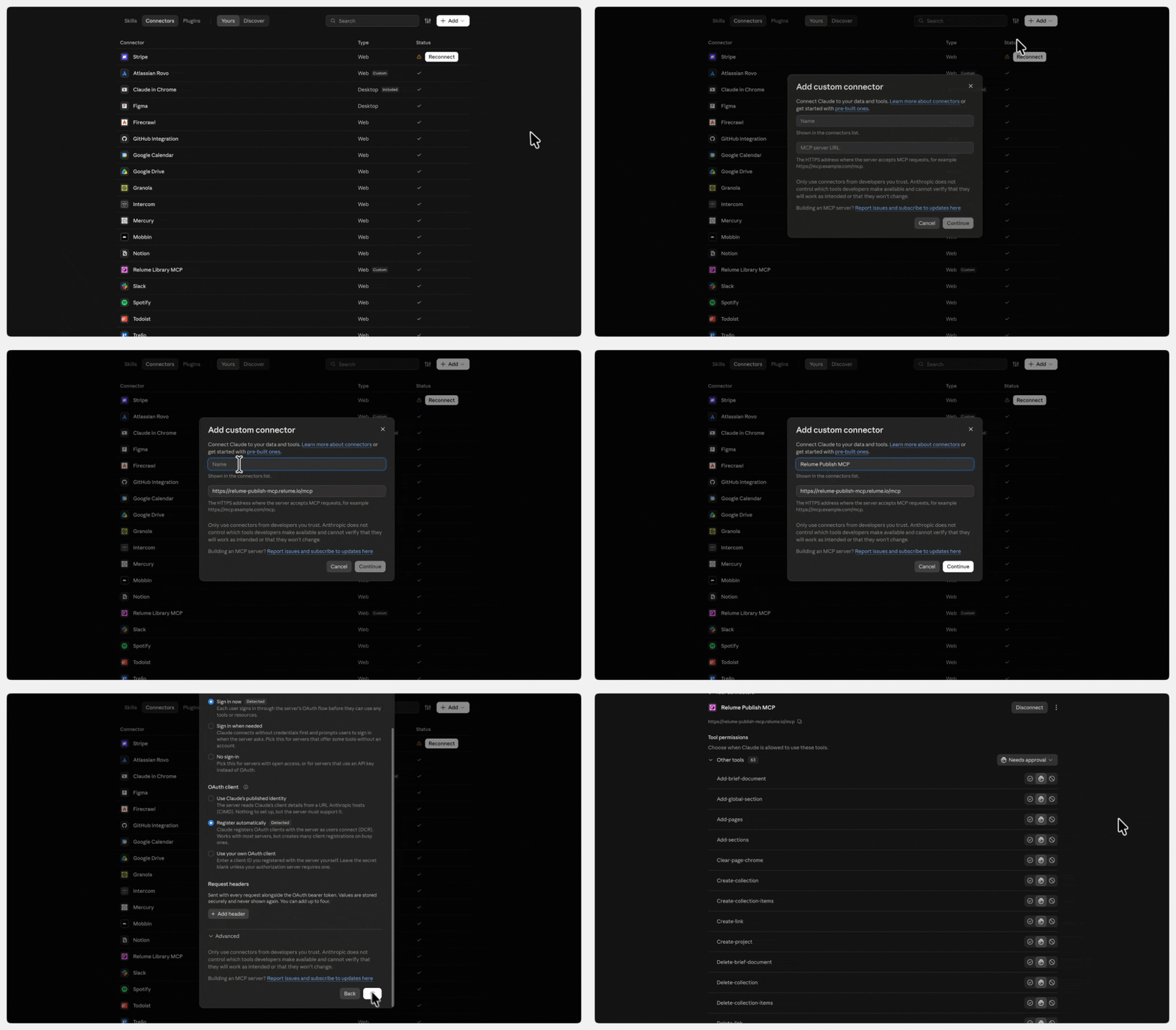
- Open Customize, then Connectors.
- Click Add custom connector and name it Relume Publish.
- Paste the URL, click Add, then Connect.
- Sign in to Relume. You're done when the connector shows Connected.
In ChatGPT:
- Go to Settings, then Security and login, and turn on Developer mode.
- On the Plugins page, click Add, then Create MCP App.
- Paste the URL into Server URL, set authentication to OAuth and click Create.
- Sign in to Relume.
On ChatGPT Business, Enterprise or Edu workspaces, an admin may need to allow custom MCP apps first.
In Claude Code with an API key, run claude mcp add --transport http relume-publish https://relume-publish-mcp.relume.io/mcp, then open /mcp and authenticate.
In Codex CLI, run codex mcp add relume-publish --url https://relume-publish-mcp.relume.io/mcp, then codex mcp login relume-publish.
Start with a small test project before you hand it a client brief.
The Relume to Webflow handoff skill
For Webflow builders, this is the headline. Publish MCP includes a skill that reads your published Relume site and rebuilds it in Webflow through the Webflow MCP.
The rebuild uses native Designer elements and Finsweet Client-First classes, so the result is a working Webflow project rather than an embed or pasted code. Any Webflow developer on your team, or the client's, can open the Designer and keep going. Relume positions it as separate from its Relume Export apps.
The setup has a fixed order:
- Publish in Relume first. The skill rebuilds from the live site and never publishes your Relume project for you.
- Clone the Relume Style Guide in Webflow. The rebuild starts from it.
- Connect both MCPs. When you authorize the Webflow MCP, select only that site.
- Send the prompt. It tells the AI to load the skill (webflow/SKILL.md via get-skill) and includes your Relume project link and Webflow site name.
- Keep the Designer tab visible for the whole run. Browsers put background tabs to sleep, which stalls the build. In Chrome, add webflow.com under Settings, Performance, Memory Saver, "Always keep these sites active."
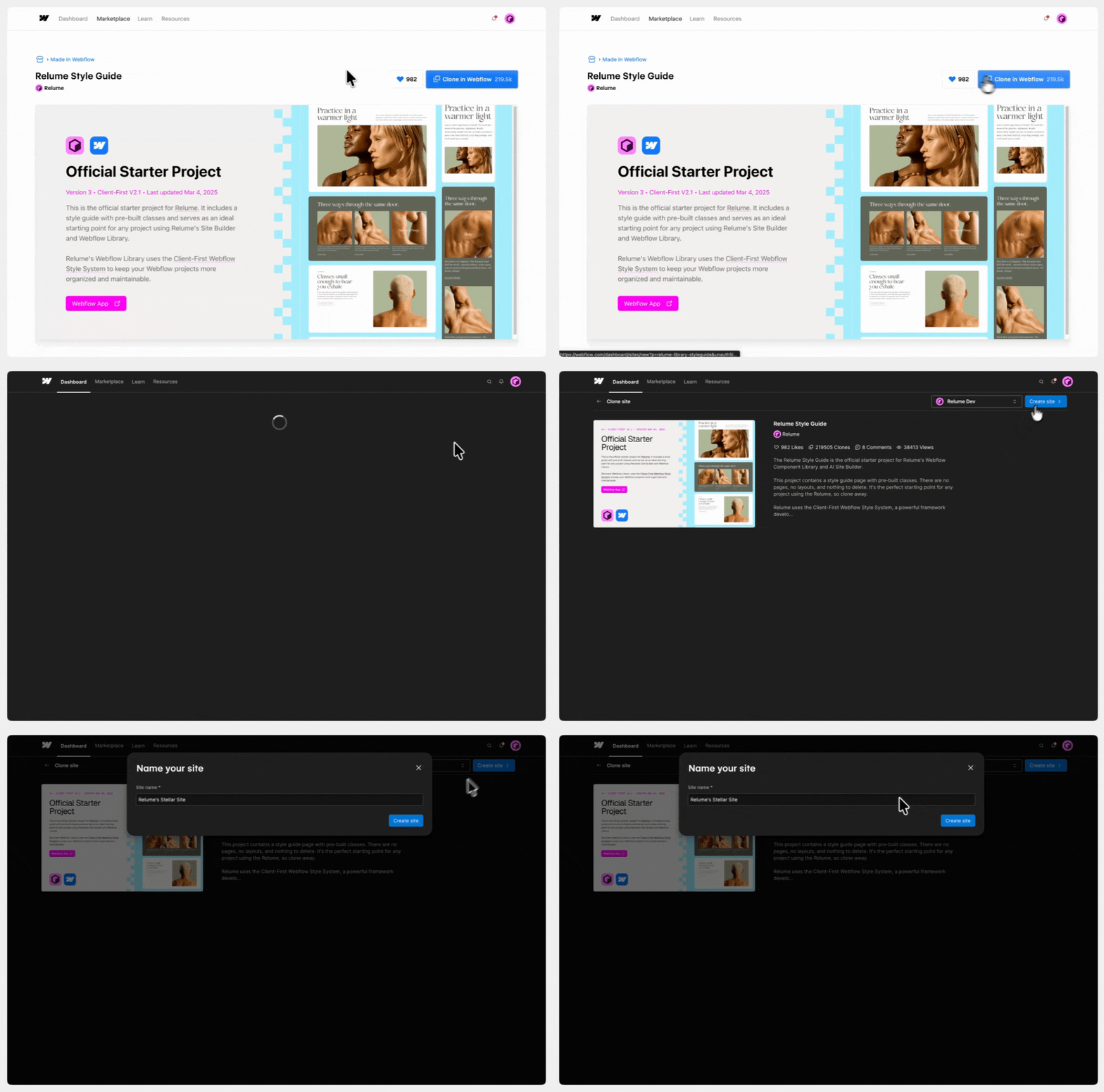
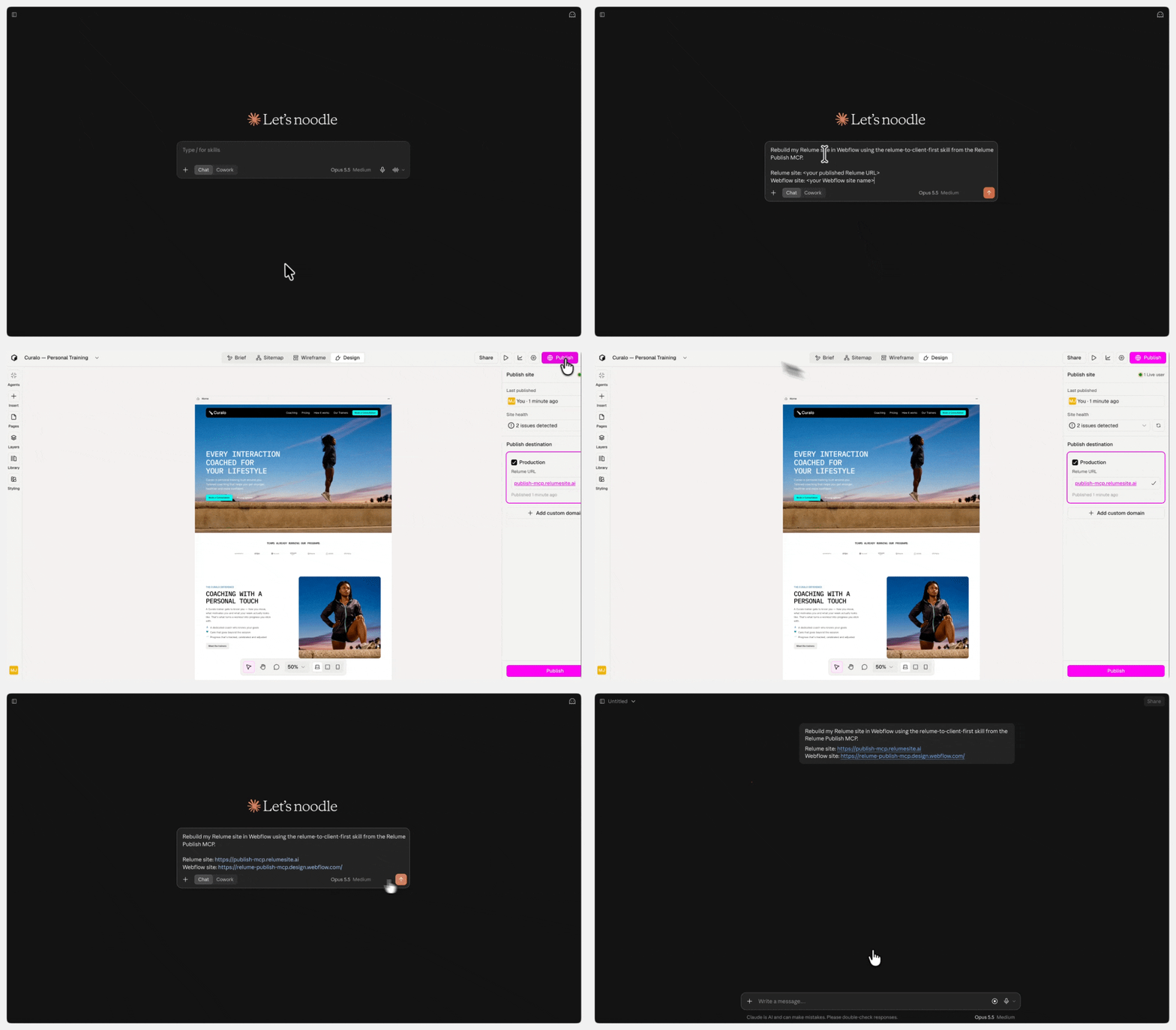
Budget about 30 minutes for a home page, and longer for multi-page sites. The skill publishes once to the webflow.io address, then returns a report of follow-ups. Expect to add fonts, check the mobile menu at tablet width, name form fields and replace placeholder links and the logo.
One limit to plan around: the skill rebuilds, it does not redesign. Make design changes in Relume before the run.
What it costs and who can use it
Publish MCP and the Webflow skill require a paid Relume plan. The Free plan and free trials do not qualify.
As of October 15, 2026, Relume's pricing page lists:
- Free hosting: $0. relumesite subdomain, 1,500 page views.
- Launch hosting: $12 per site per month ($144/year). Custom domain, white label, 6,000 page views.
- Pro (AI usage): From $14 per month ($168/year). 5x or 20x AI usage.
Confirm which tier your account needs before you pitch this workflow to a client. If you only rebuild and host in Webflow, treat the Relume subscription as a build tool cost, not a hosting cost.
What Webflow builders should weigh before switching workflows
Publish MCP is a step past generic AI site builders, because the assistant assembles tested Relume components instead of inventing markup. The trade-offs are still real.
- Two builds to maintain. If the client lives in Webflow, the Relume version becomes a staging copy. Decide upfront which one is the source of truth.
- No Relume CMS yet. Relume says its CMS is landing very soon. Until it does, a blog or collection pages need the Webflow route.
- Cleanup is part of the job. Even Relume's demo rebuild needs tidying, and the Designer tab has to be babysat. Price the follow-up list into estimates.
- Demo results come from one site. A yoga studio scoring 100 on Lighthouse is a good sign, not a benchmark for a 40-page B2B site with heavy media.
- Input quality drives output quality. The demo starts from a completed questionnaire. Teams with strong discovery docs will get more out of this than teams prompting from a one-line request.
The bottom line
Publish MCP moves Relume from a component source for AI tools toward an AI-operated site builder, with a direct path into Client-First Webflow. For agencies that already run discovery in Claude or ChatGPT, it cuts the copy-paste between client notes, Relume and the client inbox.
Test it on an internal or low-stakes project first. Run the full loop once, from questionnaire to Webflow rebuild, and time the cleanup. That number tells you whether it belongs in client delivery.
FAQ
What is the Relume MCP?
Relume offers two MCP servers. The Relume Library MCP, released July 1, 2026, brings Relume's 1,000+ components into AI tools like Cursor, Claude, Windsurf and VS Code. The Relume Publish MCP, released October 14, 2026, lets Claude or ChatGPT build, publish and update full Relume websites. Both connect through a server URL you add to your AI tool.
Is the Relume Publish MCP free?
No. Relume Publish MCP requires a paid Relume plan and does not work on the Free plan or during a free trial. As of October 15, 2026, Relume's Launch hosting is $12 per site per month and Pro AI usage starts at $14 per month, both billed yearly.
Can Relume export to Webflow with AI?
Yes. Publish MCP includes a skill that rebuilds a published Relume site in Webflow through the Webflow MCP, using native Designer elements and Client-First classes. You clone the Relume Style Guide into Webflow, connect both MCPs and send one prompt. A home page takes about 30 minutes and needs manual cleanup afterwards.
Does Relume Publish MCP work with ChatGPT?
Yes. In ChatGPT, turn on Developer mode under Settings, create an MCP App with the Relume Publish server URL and OAuth authentication, then sign in to Relume. Business, Enterprise and Edu workspaces may need an admin to allow custom MCP apps first. It also works in Claude, Claude Code, Codex and Cursor.

